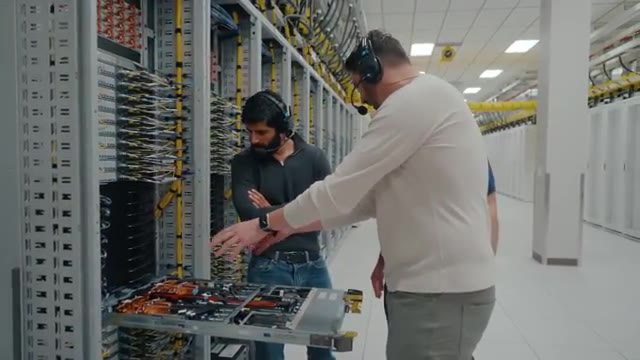
Weekly Video Notes — a short article distilling one talk from the weekly digest. Source video and key frames are embedded throughout.
Dwarkesh Patel got an unusually concrete tour of a working AI training facility this week: Jane Street’s GB300 NVL72 cluster in Texas, guided by Ron Minsky (co-head of the technology group) and Daniel Pontecorvo (physical engineering). It’s only 16 minutes long, but it’s a dense walk through the things that actually break when you try to put modern GPU racks into a building that was never designed for them — cooling, leak detection, power balancing, and miles of copper and fiber.
A retrofit, not a greenfield
The facility was originally built for traditional 10–40 kW air-cooled racks. Each GB300 cabinet on the floor today peaks at about 140 kW. To make that work, Jane Street retrofit the hall for direct-to-chip liquid cooling while keeping a sliver of legacy air capacity: roughly 15% of cabinets are still air-cooled for components that don’t take cold plates.
Around the perimeter, the old CRAC-style air units are still bolted to the walls — partly because some of the heat load still wants air, and partly because the same chilled-water loop now feeds both systems. “We use the same fluid for the air cooling,” Pontecorvo notes, “so it’s fungible within the data center. We can move the fluid around.”

The water loop
Chilled fluid arrives from rooftop chillers at about 18 °C. Before it ever touches a GPU, it goes through a CDU (cooling distribution unit) that uses a heat exchanger to separate two loops:
- The building loop — what comes off the chillers.
- A “technical water” loop that actually reaches the cold plates. This one is filtered to 25 microns so the micro-channels in the cold plates don’t clog, and it’s filled with a 25% propylene glycol / deionized water mix to inhibit algae and bacteria growth that could otherwise plug the heat exchanger between GPU and cold plate.
Dwarkesh’s reaction is the natural one: “I don’t love the world where we have to worry about bacteria growing in our servers.”
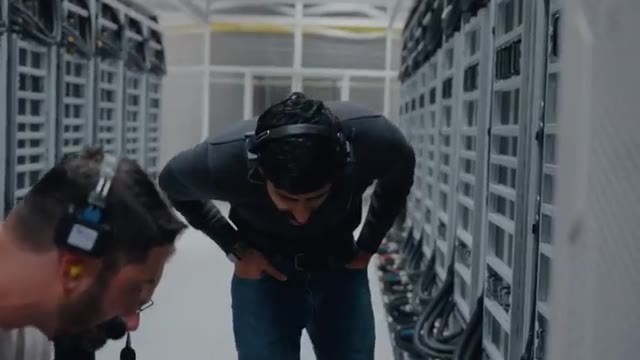
The flow-balancing is more important than it sounds. Without it, the first cabinets on a manifold soak up all the coolant and the last cabinets thermal-throttle. The ultrasonic meters measure flow in real time and the valves cap each cabinet at a rate matched to its expected heat rejection.
Leaks, ropes, and the case for under-floor piping
A recurring theme: Jane Street’s ops culture spent decades keeping water out of data centers. Now it’s piped directly to the silicon.
Their answers are layered:
- Server-level leak ropes under the chassis trigger alerts via the management network if they sense moisture.
- Under-floor leak detection catches drips that escape the rack, with valves to isolate the affected section.
- Under-floor piping in this site rather than the trendier overhead manifolds. The industry is moving overhead for speed of deployment (raised floors take time to build), but overhead piping drips straight into the data hall; under-floor piping drips into a contained, instrumented space.

If a leak does get through to the server, “you are at risk of destroying the server.” It hasn’t happened often, but, as Pontecorvo puts it, “this stuff is new… it’s yet to be seen over time how this works out.”
Power: 4,032 GPUs, balanced across bus bars
The hall holds 4,032 GPUs in 56 racks. Power lands at UPSes, fans out to breaker panels, then runs overhead in bus ways to each row. The two design constraints worth remembering:
- Don’t trip a breaker mid-training run. Operators are explicit about how many racks share a bus and how close each bus is to its current limit. If you trip, “you have to go back to some book worth” — a sentence that lands harder when you remember the per-hour opportunity cost of a Blackwell rack.
- Cooling is fungible, power isn’t. You can over-size pipes and shuffle coolant. Power has hard breaker and ampacity limits, so any flexibility has to be designed in by over-building the distribution itself — extra bus ways, headroom on each panel, the ability to grow CPU here or GPU there as the business needs change.
Software does its share. Jane Street built their own monitoring platform — a “single pane of glass” pulling from breakers, PDUs, and node telemetry — that’s topology-aware and can pre-emptively shut workloads down rather than let a breaker trip. NVIDIA is helping from the hardware side too, rolling out an LPS (Load Power Smoothing) system in newer cabinets with extra bulk capacitance and software that narrows the gap between peak and average draw, so you can safely oversubscribe closer to the breaker limit.
Opportunity cost, not capex
Asked the inevitable “what does an hour on a Blackwell rack cost?” question, Minsky reframes it: there are two prices, the hardware-amortization price and the opportunity cost — and the second one dominates. Compute is inelastic on short timescales; internally at Jane Street, teams bid against each other for cycles, and the value extracted from a training run on a trading model is high enough that “the opportunity cost tends to dominate the hardware cost. Even though the hardware costs are not small.”
This is why power constraint translates into floor-space efficiency rather than fewer GPUs: if the utility allocation is fixed and compute gets denser, you simply use less of the data hall. Half the room is empty, which is also “why you can afford to put a podcast studio in this place.”
8,000 kilometers of fiber — and why the fastest links are still copper
The networking subsection is brief but punchy. Most of the inter-rack cabling visible in the hall is fiber — about 8,000 km of it in this deployment — but the fastest, latency-critical links inside each rack are copper.
“Light moves more slowly in fiber than electrons move in copper.”
So at every scale of the network hierarchy you’re trading off bandwidth, distance, and latency, and the result is that copper short-reach plus fiber long-reach is the equilibrium even in 2026.

The thermal battery on the mechanical floor
Out in the mechanical yard, large buffer tanks sit between the chillers and the data hall — effectively a thermal battery. If grid power blips and the rooftop chillers have to restart, the buffer keeps GPUs cool through the gap. It also dampens the temperature swings caused by training workloads ramping up and down. Above the tanks are oversized chain-wheel valves (the orange ones extended with extra chain so they don’t bonk anyone on the head) for isolating sections during leak repair.
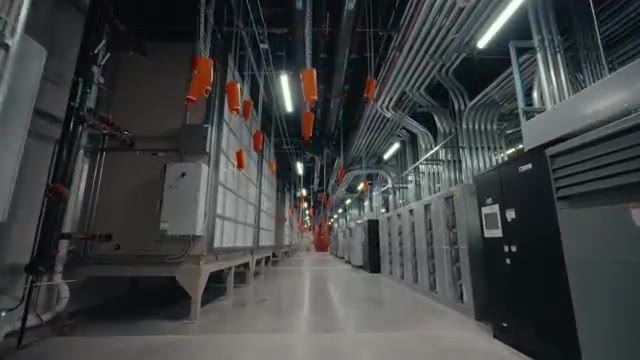
Pontecorvo’s bigger-picture observation: as compute density rises, the compute footprint shrinks and the support footprint grows. Transformers, chillers, switchgear — the infrastructure-to-silicon ratio is going up, not down.
From six Dells on a desk to 4,032 GPUs
The tour closes with Minsky reminiscing about Jane Street’s first compute cluster: “the hive,” literally six Dell boxes stacked at the end of a row in the office, including the production trading systems. They kept the boxes near humans partly so someone could yank the plug if something went wrong — until the day a cleaner unplugged a live trading system mid-vacuuming. That was, eventually, the argument for moving everything into a real data center.
It’s a useful bookend. The 16 minutes you just watched are about one big retrofit, but Jane Street’s compute story has gone from unplug-it-with-your-hand to 140 kW liquid-cooled cabinets balanced across topology-aware breakers in roughly two decades — and most of the engineering effort you can see in the frames is, fundamentally, about preserving the ability to keep changing your mind about what the next decade of compute will look like.
Source: Dwarkesh Patel — Dwarkesh Goes Inside Jane Street’s Latest AI Data Center. Frames captured from the video.